Remote Desktop
Remote Desktop allows you to control a computer from another device over the internet via Redamp.io application.
Introduction
Remote Desktop allows you to control a computer from another device over the internet via Redamp.io application.
Right now, we only support Windows -> Windows and Mac -> Windows connections via our Redamp.io application.
Key Features
RDP connection
Standard RDP connection is the most common type of connection. The remote user doesn't need to be logged in or on the computer. If some users are logged in, they will be logged out after you connect. Doesn't require permission from the user.
Support connection
Support connection is a special type of connection that allows you to connect to a already logged in user on the remote device. The user will be able to see the remote desktop and control it as well as you. Great for providing support to the user. Requires permission from the remote user.
Authentication types
We support the following authentication types:
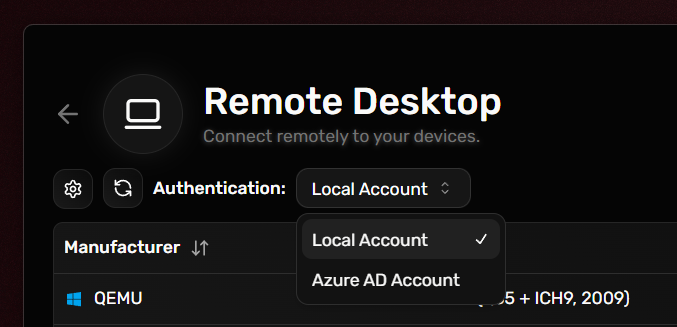
- Local Account - Sign in with credentials from an account that exists on the remote device itself.
- Azure AD Account - Sign in to the remote device using your Azure AD account.
By default, we use Local Account authentication type. You can change it to Azure AD Account in the top left corner of the Remote Desktop page.
How to use Remote Desktop?
Prerequisites
- Install Redamp.io application on both the remote and local devices.
- Login to Redamp.io application on both the remote and local devices.
Video tutorial
Text tutorial
- Open Redamp.io app - Launch the Redamp.io app on your managed device.
- Click on the "Remote Desktop" card - On the main dashboard in the Redamp.io app click on the Remote Desktop card.
- Choose a device and click RDP or Support - more info about connection types in Key Features section.
- Enter user credentials - enter the username and password of the user you want to connect to.
- End the session when finished - When you are happy with ending the session, you can just close the Remote Desktop window.