Renewing the ABM server token
Learn how to renew the Apple Business Manager server token for iOS & iPadOS MDM in Redamp.io platform before it expires.
The ABM server token connects your Apple Business Manager account (Apple now calls it Apple Business) to Redamp.io MDM. See Key terms . Apple issues the token for one year, and the exact expiry date comes with the token. Renew it before it expires: it takes a few minutes and your devices do not notice.
You also need a new token when the person who downloaded the current one changes their Managed Apple Account password or leaves your organization.
What stops working when the token expires
- No new zero-touch enrollment. Devices from Apple Business Manager can no longer enroll through ADE (Automated Device Enrollment). In Enroll new devices the ADE option is greyed out.
- No device sync from Apple Business Manager. Devices you buy or assign in Apple Business Manager no longer show up in the console.
- Enrolled devices keep working. Devices that are already enrolled stay managed and keep receiving configurations and commands.
The Apps and Books token is separate and has its own expiry date. See Installing App Store apps with Apps and Books .
How the console warns you
Go to MDM → iOS + iPadOS. The Apple credentials strip at the top shows how many days the token has left in the ABM cell. Click Details to see the exact expiry date.
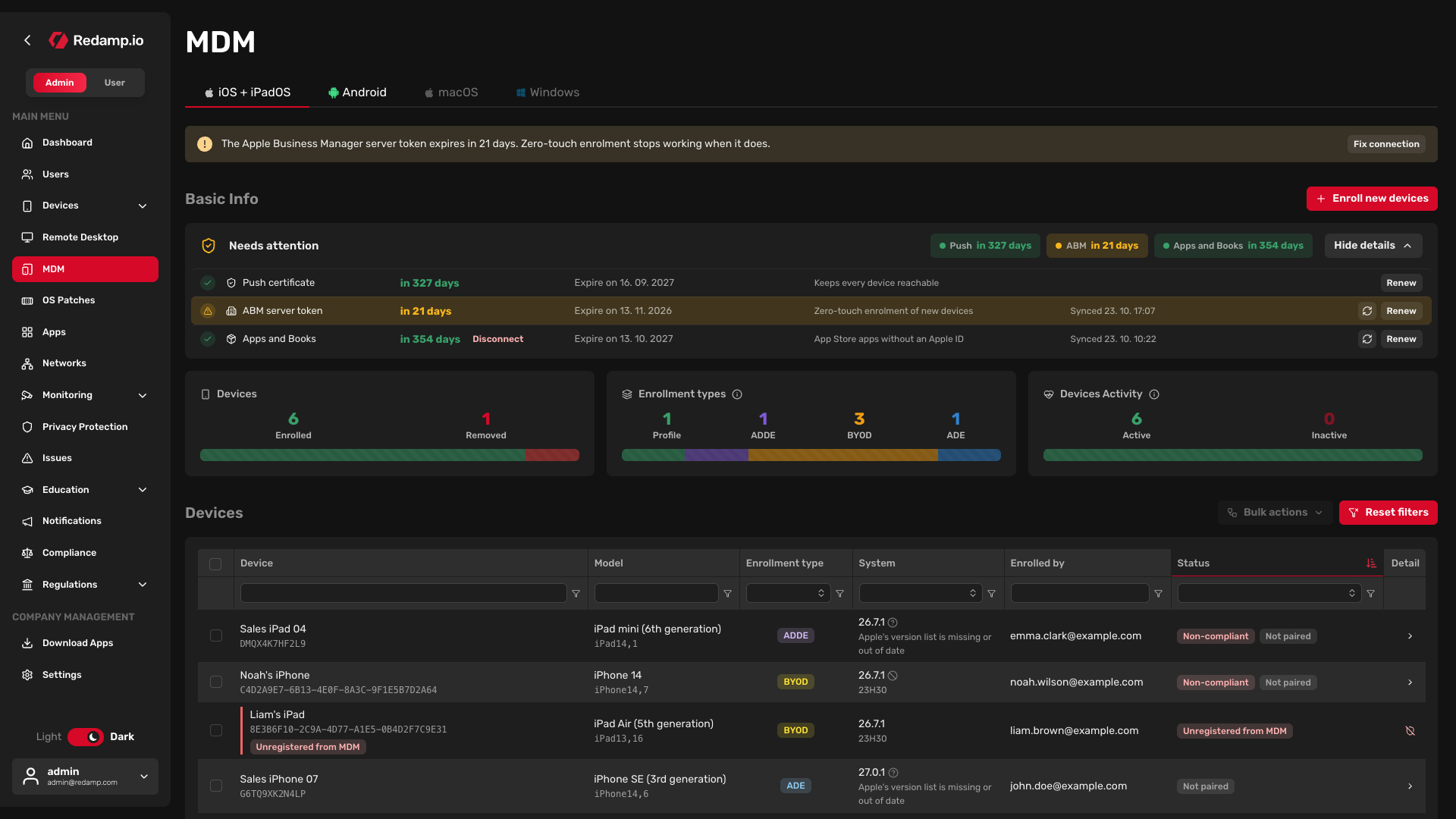
- 30 days or fewer - the ABM cell turns orange and a banner appears above the page.
- 7 days or fewer - the cell and the banner turn red.
- Expired - the cell shows Expired and the banner says no new device can enroll zero-touch.
Company admins also get an e-mail 30 days before the expiry, then every day during the last 7 days, and every day for 30 days after the token has expired.
Renew the token
Renewing keeps the same service in Apple Business Manager and the same certificate in Redamp.io. You only download a new token and upload it to Redamp.io.
Step 1 - Open the renewal wizard
In the Apple credentials strip, click Renew next to ABM. The Replace ABM server token wizard opens.
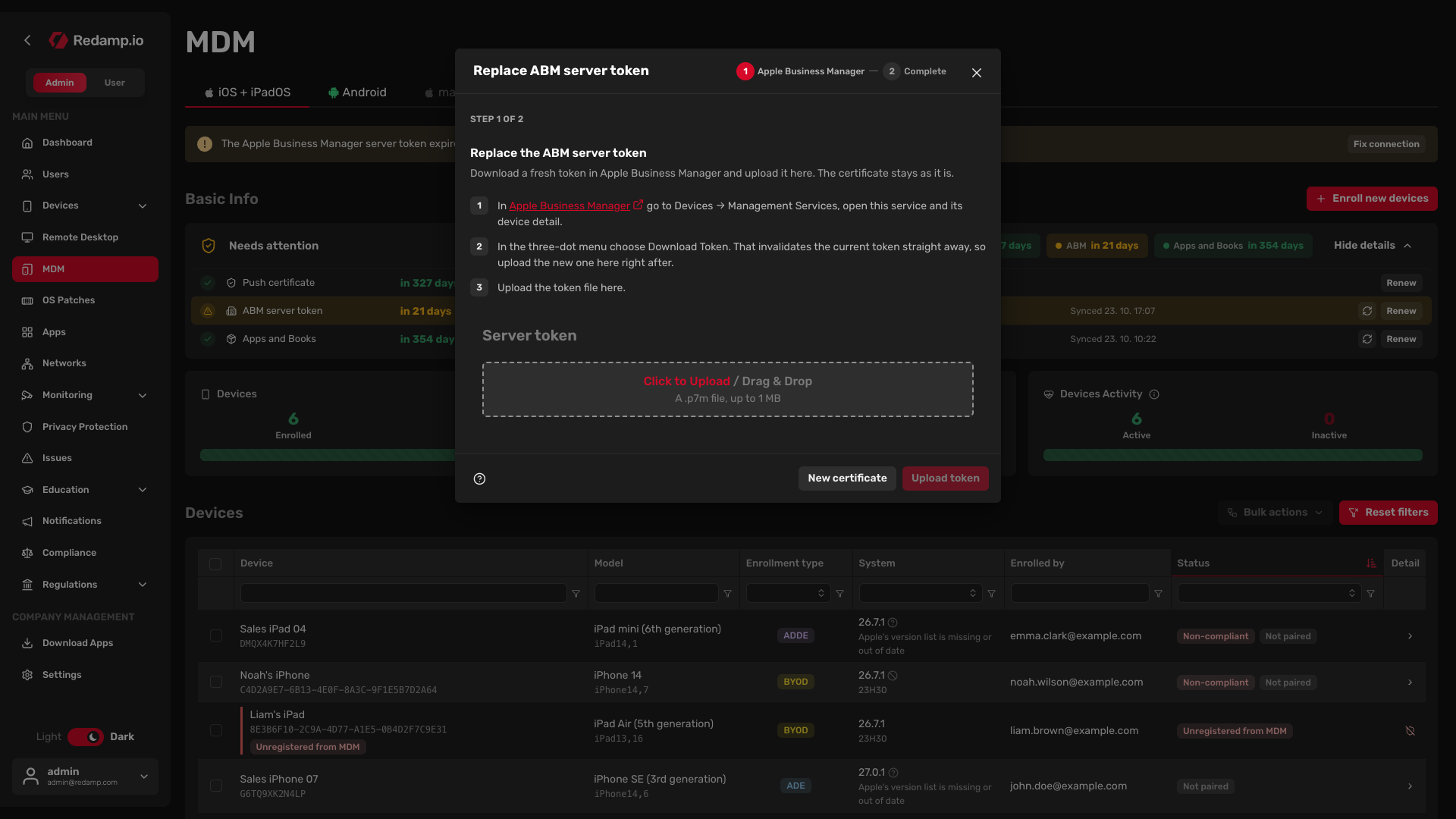
Tip: Use Renew in the strip. The Fix connection button in the banner opens the first-time setup wizard instead.
Step 2 - Download a new token in Apple Business Manager
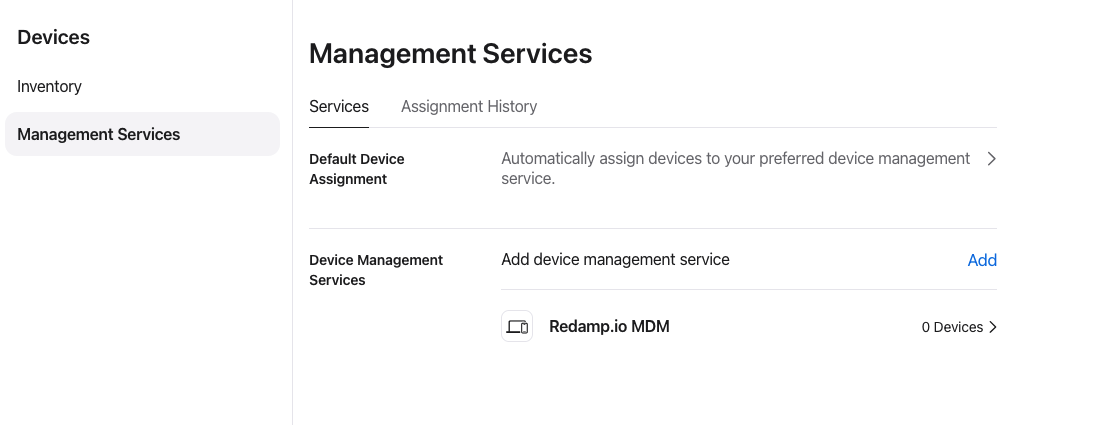
- Sign in to Apple Business Manager .
- Go to Devices → Management Services and click the service you connected to Redamp.io.
- Click ⋯ in the top right corner and choose Download Token. Your browser saves a
.p7mfile.
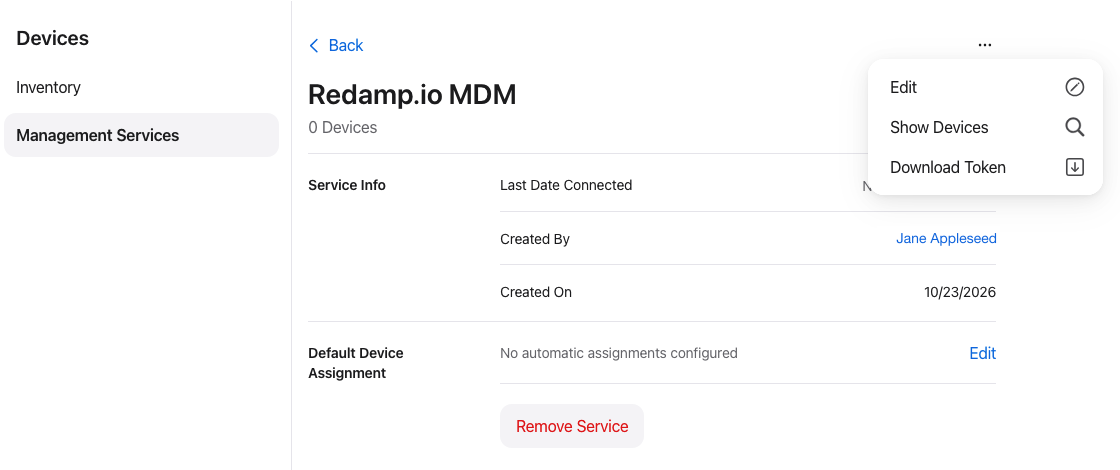
Important: Upload the new token in the next step right after you download it, so Redamp.io and Apple Business Manager use the same token.
Step 3 - Upload the token
Back in the wizard, drop the .p7m file into the Server token field and click Upload token.
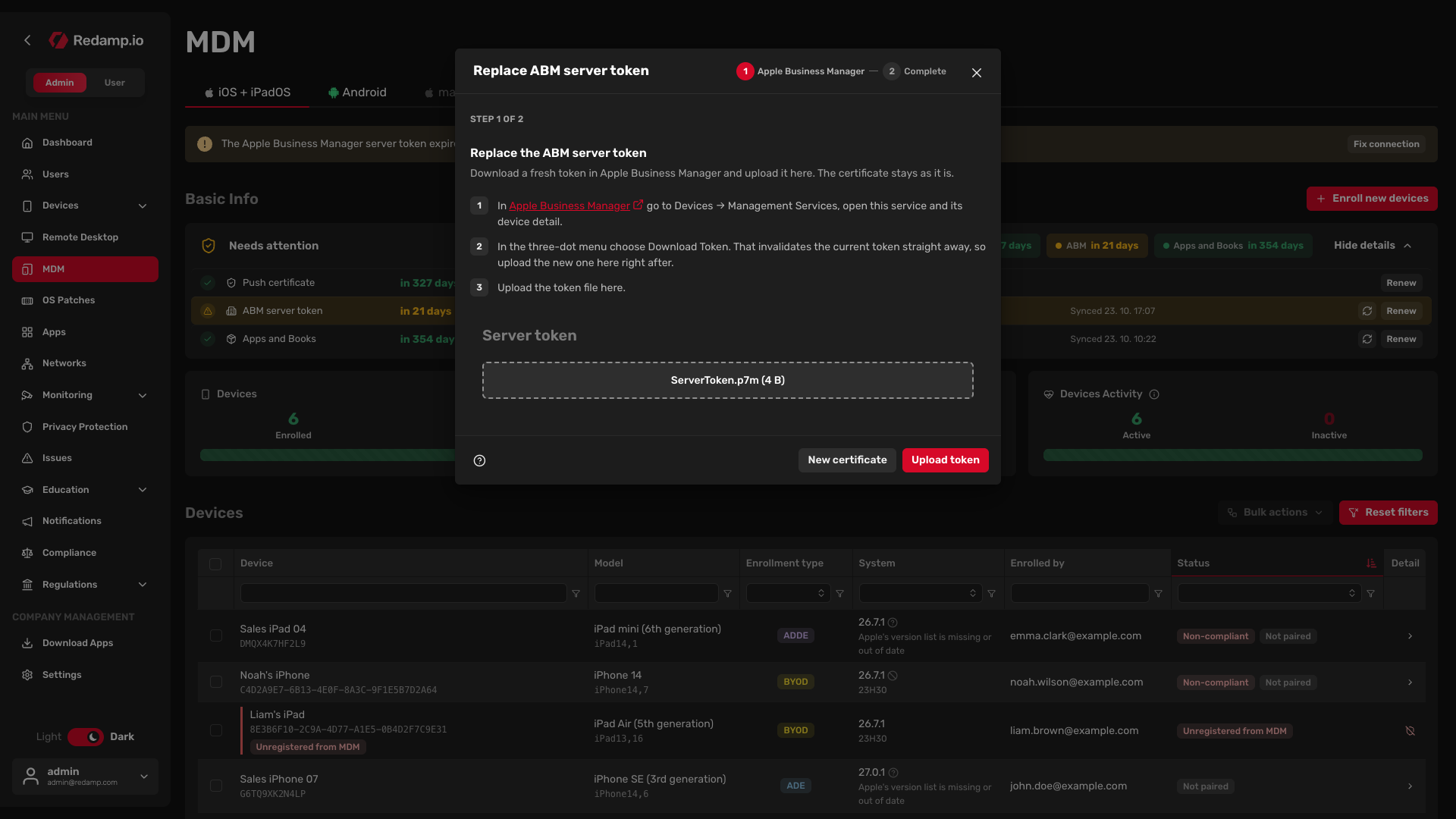
Step 4 - Check that Apple accepted the token
Redamp.io checks the new token with Apple right after the upload. The Check that Apple accepted the token step shows the result.
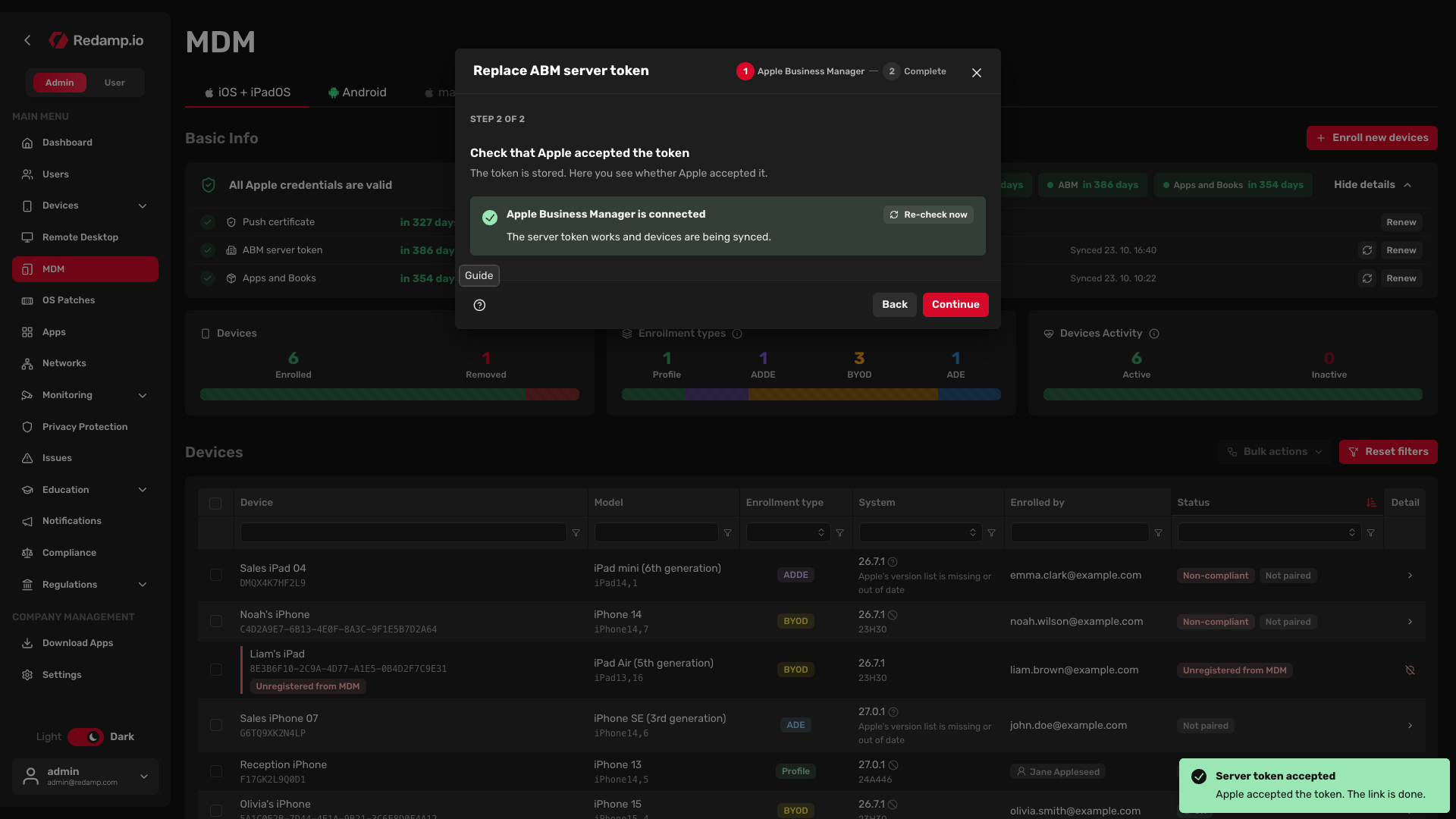
- If you see Apple Business Manager is connected, click Continue. The wizard ends with Server token replaced and the new expiry date appears in the Apple credentials strip.
- If you see a different status, follow If Apple does not accept the token .
If Apple does not accept the token
| Status | What it means | What to do |
|---|---|---|
| The server token has expired | The uploaded token is no longer valid. | Download a new token in Apple Business Manager and upload it again. |
| Apple refused the credentials | Apple rejected the token. | Download the token again and check it came from the right Apple Business Manager account. |
| Apple's terms are not accepted | Apple published new terms that nobody has accepted yet. | Sign in to Apple Business Manager, accept the updated terms, then click Re-check now. |
| Temporary problem | Redamp.io could not reach Apple. | Wait a moment and click Re-check now. |
Common mistakes
- Generating a new certificate. The wizard lets you go back and generate a new certificate, but you do not need one to renew the token. A new certificate makes the stored token unusable, and you would have to upload the new certificate to Apple Business Manager before downloading a token again.
- Downloading the token from a different service. Download the token from the same service in Management Services that you connected to Redamp.io. If you want to move MDM to a different Apple Business Manager account, contact Redamp.io support first.