Enrollment types for iPhones and iPads
Compare the four ways an iPhone or iPad can be enrolled in Redamp.io MDM (Profile, ADE, BYOD and ADDE) and pick the one that fits the device you have.
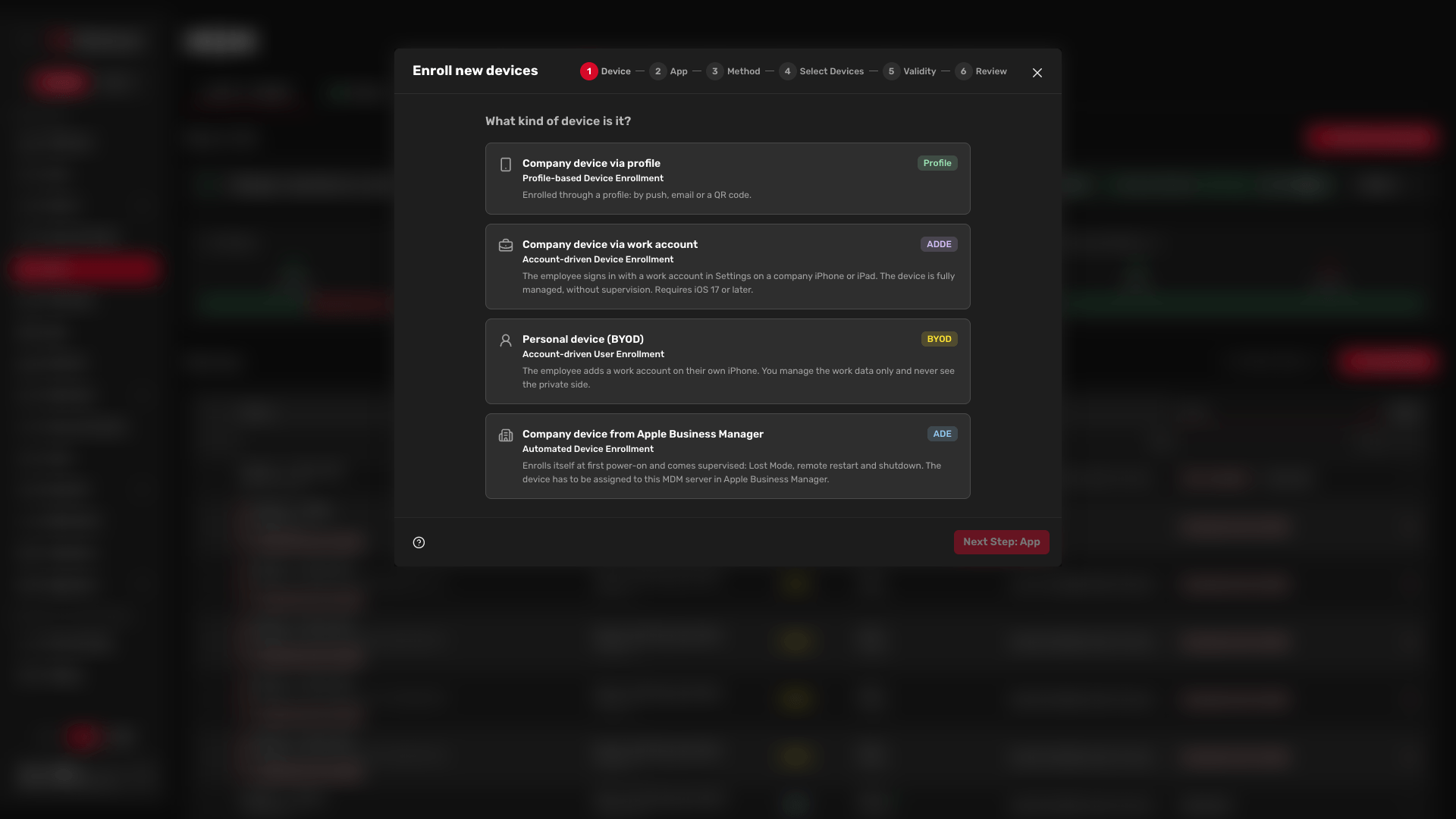
Before every enrollment, the console asks What kind of device is it? Your answer sets the enrollment type, and the type decides what you can manage on the device. It is set when the device enrolls and cannot be changed later, so pick it before you send anything.
This article compares the four types. For short definitions of the acronyms, see Key terms .
Which one to pick
Three questions decide it:
- Is the device in Apple Business Manager? Use ADE.
- Is it an employee's personal phone? Use BYOD.
- Will the employee sign in with a work account on iOS 17 or later? Use ADDE.
For any other device, use Profile.
| ADE | ADDE | BYOD | Profile | |
|---|---|---|---|---|
| Console card | Company device from Apple Business Manager | Company device via work account | Personal device (BYOD) | Company device via profile |
| Apple name | Automated Device Enrollment | Account-driven Device Enrollment | Account-driven User Enrollment | Profile-based Device Enrollment |
| How it enrolls | By itself at first power-on or after a reset | The user signs in with a work account in Settings | The user signs in with a work account in Settings | The user installs a profile from an invitation |
| What you control | The whole device, every restriction and command | Settings, apps and commands as with Profile | Only work data and managed apps | Settings and apps, without the supervised-only features |
| Supervised | Always | Never | Never | Only if prepared in Apple Configurator |
| Erase removes | The whole device | The whole device | Not possible, unenrolling removes only work data | The whole device |
| Requires | Apple Business Manager and an enrollment profile | Apple Business Manager and a verified domain set to ADDE | Apple Business Manager and a verified domain | Only the push certificate |
Basic MDM or Apple Business Manager
How you set up MDM decides which types the console offers.
- Basic MDM works with any iPhone or iPad, no matter where it was bought. The only enrollment type is Profile. Configuration types and settings that need a supervised device are not offered.
- Apple Business Manager adds ADE, BYOD and ADDE. Profile keeps working next to them.
You can start with Basic MDM and connect Apple Business Manager later. See Basic MDM setup and Apple Business Manager setup .
Company device from Apple Business Manager (ADE)
Use ADE for company-owned devices bought from Apple or an authorized reseller. These devices appear in Apple Business Manager.
- How it starts - You assign the device to this MDM server in Apple Business Manager and give it an enrollment profile, otherwise it gets the default one. Nothing is sent from the console. At first power-on, or after a reset, the device enrolls itself in Setup Assistant.
- What you get - The device is always supervised, so every restriction and command is available, including Lost Mode and remote restart and shutdown.
- What it needs - A valid Apple Business Manager server token. While the token is missing, expired or rejected by Apple, the console does not offer ADE.
Step by step: Enrolling company devices with ADE . What the employee sees: ADE user guide .
Company device via work account (ADDE)
Use ADDE for a company iPhone or iPad that is not in Apple Business Manager, when the employee enrolls it by signing in with their work account.
- How it starts - The employee goes to Settings › General › VPN & Device Management and signs in with their work account. The steps are the same as for BYOD. Requires iOS 17 or later.
- What you get - Full device management without supervision, the same as Profile. You see the serial number and all apps, and you can lock and erase the whole device. Supervised-only features are not available.
- What the user can do - Remove management from the device themselves.
- What it needs - A verified work account domain with the enrollment type set to ADDE. The domain redirect must pass the query string on, otherwise the console does not offer ADDE.
Warning: ADDE applies to every iPhone or iPad that signs in with a work account on that domain, including employees' personal devices. All of them get full device management, and you can erase them completely.
What the employee sees: ADDE user guide .
Personal device (BYOD)
Use BYOD for an employee's own iPhone or iPad. You manage only the work data and never see the private side.
- How it starts - The employee goes to Settings › General › VPN & Device Management and signs in with their work account. The device creates a separate work space.
- What it needs - A verified work account domain set to personal devices.
Apple limits what you can do on a BYOD device:
- Erase and Clear passcode are not allowed.
- Hardware and passcode details stay empty, because Apple withholds them.
- The device reports only managed apps and managed profiles, never everything installed.
- Passcode settings are ignored and system updates cannot be enforced.
- An app the employee already installed from the App Store cannot be taken over by MDM.
When the device is unenrolled, the work data and managed apps are removed. Personal apps and data stay.
What the employee sees: BYOD user guide .
Company device via profile (Profile)
Use Profile for a company device that never went through Apple Business Manager, or one that is already in use. It is the only type available with Basic MDM.
- How it starts - Click Enroll new devices and send an invitation. It reaches the device by a push notification to the Redamp.io app, by email, or as a QR code you scan on the spot. The user opens the link, downloads the profile and installs it in Settings.
- What you get - Settings, apps and commands, including lock and erase. The device is not supervised, unless it was prepared in Apple Configurator before enrolling.
- What the user can do - Remove the profile, which takes the device out of management.
- What it needs - Only the push certificate.
How to send invitations: Inviting devices to enroll with a profile . What the employee sees: Profile user guide .
What supervision adds
A supervised device is one Apple hands fully to the organization, in practice through ADE. Only a supervised device takes:
- Restart and Shut down
- Lost Mode
- the Activation Lock bypass code
- configuration settings marked Supervised, for example most restrictions, and system update settings
The console marks what a device type cannot take, so you do not have to remember it. For the full list of commands per enrollment type, see Remote commands for iPhones and iPads .
BYOD or ADDE for a domain
BYOD and ADDE both start with the same work account sign-in, so the console decides between them by the domain, not by the device. In the Apple Business tab, each verified domain has an Enrollment type, set for iPhone and iPad separately. The default is BYOD.
How to verify a domain and set its type: Apple Business Manager setup .